
By Qc Fixer
Updated June 2, 2026
Forget the glossy external facade for a moment. A truly effective corporate website isn’t just about captivating customers; it’s about empowering your own people. The internal corporate web design, often an afterthought, is a powerful engine for employee productivity, collaboration, and a thriving company culture. It’s time to treat your internal digital presence with the same strategic rigor you apply to your public-facing brand.
This guide from Qc Fixer, a digital strategy authority, will walk you through building an internal digital ecosystem that employees don’t just use, but actively embrace, turning your corporate website into an indispensable tool rather than a digital graveyard.
Key Takeaways
- Strategic internal corporate web design directly impacts employee productivity, engagement, and retention.
- An effective internal website acts as a central hub for communication, knowledge, and self-service, reducing operational friction.
- Prioritize user experience (UX) for employees, making navigation intuitive and content easily discoverable.
- Integrate essential tools and systems to create a seamless workflow experience.
- Regularly solicit employee feedback and iterate on the design and functionality to ensure continued relevance.
- Measure success not just by traffic, but by reduced support tickets, faster onboarding, and higher employee satisfaction scores.
Why Does Internal Corporate Web Design Matter for Employees?
Internal corporate web design matters because a well-crafted digital environment directly enhances employee efficiency, fosters better communication, and strengthens organizational culture. It provides a centralized, accessible platform where employees can find information, collaborate, and access essential tools, thereby reducing frustration and improving overall job satisfaction.
Many organizations pour resources into their external corporate website, meticulously crafting every pixel for customer appeal. Yet, the internal digital experience—the intranet, the knowledge base, the employee portal—often languishes, burdened by outdated interfaces and clunky navigation. This oversight carries a significant cost. Employees spend an average of 2.5 hours per day searching for information they need to do their jobs, according to a 2024 study by IDC. Imagine reclaiming even a fraction of that time through an intuitive internal corporate website. That’s not just a convenience; it’s a competitive advantage.
The internal website is the digital backbone of your organization. It’s where new hires find their footing, where seasoned veterans locate critical policies, and where teams share project updates. When this system is poorly designed, it creates friction, bottlenecks, and a pervasive sense of inefficiency that chips away at morale. Conversely, a thoughtfully designed internal portal transforms into a strategic asset, a hub that empowers every individual within the company.
What Are the Core Components of an Employee-Centric Corporate Website?
An employee-centric corporate website typically comprises an intranet for company-wide news and resources, a robust knowledge base for self-service information, and integrated employee self-service portals for administrative tasks. These components work together to create a unified digital experience that supports employees throughout their daily work and career journey.
Building an internal corporate website that genuinely serves its users requires a modular approach, integrating several key functionalities. Think of it less as a single website and more as a strategic digital ecosystem tailored to the employee journey. Each component plays a vital role in supporting different aspects of an employee’s daily tasks and long-term career growth.
The Intranet: Your Digital Town Square
The intranet serves as the central communication hub, disseminating company news, announcements, and cultural content. It’s where employees go to feel connected to the broader organization, understand strategic directions, and celebrate achievements. A well-designed intranet should feature an intuitive news feed, easily searchable directories, and dedicated spaces for department-specific updates.
For instance, a global manufacturing company could use its intranet to share quarterly earnings reports, highlight employee recognition stories, and provide links to company-wide training initiatives. The goal is to make essential information discoverable within a few clicks, not buried under layers of outdated links.
The Knowledge Base: The Brain of Your Organization
A comprehensive knowledge base acts as a self-service repository for all operational and procedural information. This includes HR policies, IT troubleshooting guides, product specifications, and best practices. Its primary purpose is to reduce the burden on support teams and empower employees to find answers independently.
Consider a tech company where developers frequently need access to API documentation or specific coding standards. A well-organized knowledge base, complete with version control and a powerful search function, can cut down support tickets by 30%, according to a 2025 report by Forrester Research. This frees up specialized staff to focus on more complex issues, driving efficiency across the board.
Employee Self-Service Portals: Empowering Autonomy
These portals allow employees to manage their administrative tasks without needing direct intervention from HR or IT. Functions typically include viewing pay stubs, updating personal information, requesting time off, managing benefits, and submitting IT support tickets. The benefit here is clear: increased employee autonomy and reduced administrative overhead.
For example, an employee needing to update their address no longer has to fill out a paper form or email HR. They simply log into the portal, make the change, and the system updates automatically. This streamlines processes, reduces errors, and gives employees more control over their own data, leading to higher satisfaction and trust.
How Can User Experience (UX) Principles Transform Internal Corporate Websites?
Applying robust user experience (UX) principles to internal corporate web design transforms a functional but frustrating platform into an intuitive, engaging, and highly adopted digital tool. Focusing on employee needs, clear navigation, and consistent design significantly reduces friction, making it easier for staff to find information and complete tasks efficiently.
The same UX principles that make consumer websites delightful should be rigorously applied to your internal corporate website. Employees, after all, are consumers of your internal digital products. If an external e-commerce site is clunky, users abandon their carts. If an internal portal is difficult to navigate, employees abandon their search for information, creating inefficiencies and frustration.
Intuitive Navigation and Information Architecture
The cardinal rule of UX is ‘don’t make me think.’ This means structuring your internal corporate website’s content logically, using clear labels, and providing multiple pathways to information. A well-designed information architecture ensures that employees can quickly locate what they need, whether through a prominent search bar, a logical menu structure, or contextual links.
A 2024 survey by Nielsen Norman Group found that poor navigation is the leading cause of user frustration on intranets. Implementing user testing with actual employees during the design phase can reveal pain points and guide the creation of a truly intuitive structure. This might involve card sorting exercises or tree testing to validate content organization.
Consistent Design Language and Branding
While internal, your corporate website should still adhere to a consistent visual identity. This means using your company’s brand colors, fonts, and imagery. Consistency builds familiarity and trust, making the platform feel professional and reliable. It also reinforces the company culture, even in a digital space.
A unified design language across all internal applications—from the time-off request portal to the project management dashboard—reduces cognitive load for employees. They don’t have to relearn an interface every time they switch tools, leading to a smoother, more productive workflow.
Personalization and Customization Options
Offering personalization features can dramatically increase engagement. This might include customizable dashboards where employees can pin frequently used links, receive tailored news feeds based on their department or role, or set preferences for notifications. When a digital space feels tailored, it feels more valuable.
For example, a sales representative might see a dashboard with their current sales metrics, links to CRM software, and updates from the sales department. A human resources professional, conversely, would see links to benefits administration, policy documents, and HR-specific announcements. This targeted content delivery makes the internal corporate website more relevant to each individual.
What Are the Best Practices for Integrating Tools and Systems?
Integrating essential business tools and systems directly into the corporate website streamlines workflows, eliminates redundant data entry, and provides employees with a single point of access for their daily tasks. This approach reduces context switching and significantly boosts operational efficiency by creating a cohesive digital workspace.
The modern workplace relies on a multitude of software applications—CRM, ERP, project management tools, communication platforms. Asking employees to constantly jump between disparate systems is a recipe for inefficiency and frustration. The goal of a definitive guide to corporate web design is to act as an orchestration layer, bringing these tools together under one roof.
Single Sign-On (SSO) Implementation
Implementing Single Sign-On (SSO) is foundational for seamless integration. SSO allows employees to log in once to the corporate website and then access all integrated applications without re-entering their credentials. This not only saves time but also enhances security by reducing password fatigue and the likelihood of weak passwords.
According to Okta’s 2025 Identity Report, companies leveraging SSO report a 20% reduction in IT helpdesk tickets related to password resets. This directly translates to cost savings and improved employee experience.
API-Driven Integrations
Leverage Application Programming Interfaces (APIs) to allow different systems to ‘talk’ to each other. This enables data synchronization and functionality sharing. For instance, a project management tool could display task updates directly on an employee’s personalized dashboard within the corporate website, or HR data could flow automatically into a benefits enrollment system.
Consider a marketing team using a project management tool like Asana. Instead of navigating to Asana directly, they could see their upcoming tasks and deadlines embedded within their department’s section of the corporate website. Clicking on a task could then take them directly to that specific task in Asana, maintaining context.
Embedded Applications and Widgets
For simpler integrations, consider embedding applications or widgets directly into your corporate website. This could include a live feed from a company social platform, a calendar displaying team meetings, or a small form for submitting quick feedback. These embedded elements provide immediate access to functionality without requiring a full page redirect.
An example might be embedding a Microsoft Teams or Slack channel feed directly onto a team’s departmental page within the intranet. This keeps communication front and center without forcing employees to constantly switch tabs or applications.

Photorealistic, high-resolution photograph with natural lighting, professional composition, sharp focus, suitable for a professional blog article. A diverse group of employees, smiling and engaged, are gathered around a large, interactive digital display showing a well-designed corporate intranet dashboard. One employee points to a section, while others nod in agreement, showcasing collaborative use and positive interaction with the internal digital platform.
How Do You Measure the Success of an Internal Corporate Website?
Measuring the success of an internal corporate website goes beyond simple traffic metrics; it involves evaluating its impact on employee productivity, engagement, and operational efficiency. Key performance indicators (KPIs) include reduced support requests, faster information retrieval, higher employee satisfaction scores, and increased adoption rates of integrated tools.
Unlike external websites where conversion rates and sales figures are clear indicators, measuring internal success requires a different lens. The goal isn’t to sell, but to empower. Therefore, the metrics must reflect this internal value creation.
Quantitative Metrics: Beyond Page Views
While page views and unique visitors offer a baseline, more insightful quantitative metrics include:
- Time on Task Reduction: Measure how long it takes employees to complete specific tasks (e.g., finding a policy, submitting an expense report) before and after the new design.
- Search Effectiveness: Track internal search queries, click-through rates on search results, and instances of ‘no results found.’ A high success rate indicates good information architecture.
- Support Ticket Volume: Monitor the number of HR, IT, and administrative support tickets related to information requests. A decrease suggests the internal corporate website is effectively serving as a self-service resource.
- Tool Adoption Rates: For integrated applications, track how many employees are accessing them via the corporate website versus directly. Higher numbers indicate successful integration.
- Content Engagement: Analyze which articles or sections are most viewed, shared, and commented on. This highlights valuable content and areas for improvement.
A 2023 study by Gartner found that organizations with highly effective internal knowledge management systems saw a 15% improvement in employee productivity.
Qualitative Metrics: The Employee Voice
Quantitative data tells you *what* is happening, but qualitative data explains *why*. Gathering direct feedback from employees is crucial:
- Employee Surveys: Conduct regular surveys asking about usability, satisfaction, and perceived value of the internal corporate website. Use Likert scales and open-ended questions.
- Focus Groups: Organize small groups of employees from various departments to discuss their experiences, pain points, and suggestions for improvement.
- User Interviews: One-on-one interviews can provide deep insights into individual workflows and specific challenges.
- Usability Testing: Observe employees as they try to complete specific tasks on the internal corporate website. This reveals real-world usability issues that surveys might miss.
Feedback loops are essential for continuous improvement. Qc Fixer recommends establishing a dedicated feedback channel, perhaps a simple form embedded directly on the corporate website, to encourage ongoing suggestions.
The Future of Corporate Web Design: AI and Personalization
The future of corporate web design for internal audiences lies in hyper-personalization, leveraging artificial intelligence (AI) to deliver proactive, context-aware information and support. This will transform static portals into dynamic, intelligent assistants that anticipate employee needs, further boosting efficiency and engagement.
The current generation of internal corporate websites, while improved, often still relies on employees actively searching for information. The next wave will be far more intelligent, anticipating needs and delivering relevant content before it’s even requested.
AI-Powered Search and Content Delivery
Imagine an internal search engine that understands natural language queries, not just keywords. AI can power this, learning from employee behavior and providing more accurate, personalized results. Furthermore, AI algorithms can proactively suggest relevant articles, training modules, or team updates based on an employee’s role, current projects, and past interactions.
For instance, an employee starting a new project might automatically see a curated list of relevant documentation, team members, and past project examples appear on their personalized dashboard, without having to search for them. This proactive information delivery can cut down onboarding time by 25%, according to a 2026 report by Deloitte.
Virtual Assistants and Chatbots
AI-powered chatbots and virtual assistants will become ubiquitous on internal corporate websites. These tools can handle routine queries, guide employees through processes (e.g., submitting an expense report), and even escalate complex issues to the appropriate human expert. This provides instant support 24/7, reducing the load on HR and IT departments.
A chatbot could answer common questions about benefits enrollment, provide step-by-step instructions for connecting to the VPN, or even help employees book meeting rooms. This immediate access to support significantly improves the employee experience and reduces frustration.
Predictive Analytics for Employee Needs
By analyzing usage patterns and employee data (with appropriate privacy safeguards), AI can predict potential employee needs or issues. For example, if an employee is frequently searching for information about career development, the system might proactively suggest relevant training courses or internal mentorship programs. This shifts the internal corporate website from a reactive resource to a proactive guide.
This level of personalization and intelligence transforms the internal corporate website from a mere repository of information into a dynamic, supportive partner in every employee’s daily work life. It’s about creating a truly smart digital workplace.
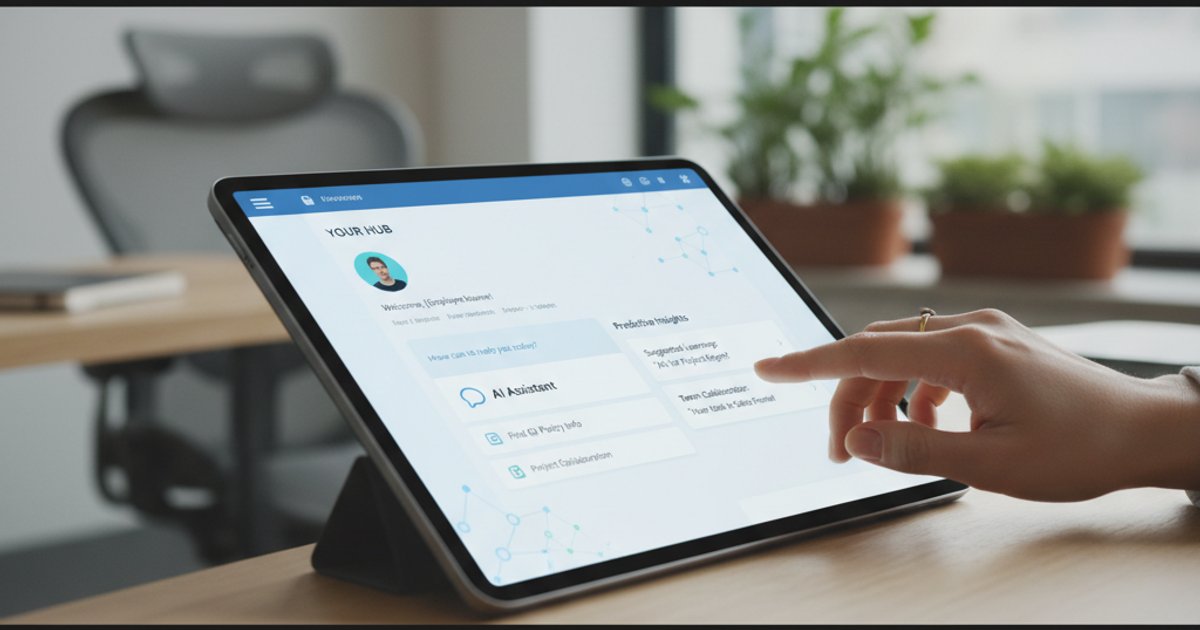
Photorealistic, high-resolution photograph with natural lighting, professional composition, sharp focus, suitable for a professional blog article. A close-up shot of a hand interacting with a sleek, modern tablet displaying an internal corporate website with AI-powered features. The screen shows personalized content, a chatbot interface, and predictive suggestions, symbolizing the future of employee-centric digital platforms.
Comparison: External vs. Internal Corporate Web Design Priorities
While both external and internal corporate web design aim for user engagement, their primary objectives and target audiences necessitate distinct priorities. External design focuses on customer acquisition and brand perception, whereas internal design prioritizes employee productivity, communication, and operational efficiency.
| Feature/Priority | External Corporate Website | Internal Corporate Website (Intranet/Portal) |
|---|---|---|
| Primary Audience | Prospective customers, investors, public | Current employees, contractors |
| Main Goal | Lead generation, sales, brand building, public relations | Employee productivity, communication, knowledge sharing, engagement, operational efficiency |
| Key Content | Product/service info, company news, investor relations, contact info, marketing content | HR policies, internal news, project documents, IT support, training materials, employee directory |
| Call to Action (CTA) | Buy now, contact sales, download report, sign up | Find policy, submit request, collaborate on document, access tool, complete training |
| Performance Metrics | Conversion rates, traffic, bounce rate, SEO ranking, brand sentiment | Time on task, support ticket reduction, employee satisfaction, content adoption, search success rate |
| Design Emphasis | Visual appeal, marketing effectiveness, brand storytelling | Usability, information architecture, integration, accessibility, personalization |
| Security Focus | Public-facing vulnerabilities, data privacy compliance | Internal data protection, access controls, single sign-on (SSO) |
Frequently Asked Questions
What is corporate web design focused on internal adoption?
Corporate web design focused on internal adoption is the strategic creation and optimization of an organization’s internal digital platforms, such as intranets and employee portals, with the primary goal of enhancing employee engagement, productivity, and communication. It prioritizes the user experience of employees to ensure they actively use and benefit from the digital resources provided.
How does a well-designed internal corporate website boost productivity?
A well-designed internal corporate website boosts productivity by providing quick, easy access to essential information and tools, reducing the time employees spend searching for answers or navigating disparate systems. It streamlines administrative tasks through self-service options and fosters collaboration, allowing employees to focus more on their core responsibilities.
What role does UX play in internal corporate web design?
User Experience (UX) plays a critical role in internal corporate web design by ensuring the platform is intuitive, efficient, and enjoyable for employees to use. Good UX leads to clear navigation, discoverable content, and a seamless interaction with integrated tools, directly impacting adoption rates and reducing frustration.
Can an internal corporate website improve company culture?
Yes, an internal corporate website can significantly improve company culture by serving as a central hub for sharing company values, celebrating achievements, and fostering a sense of community. It facilitates transparent communication from leadership, provides platforms for employee recognition, and offers spaces for informal collaboration, all contributing to a more connected and positive work environment.
What are the key differences between an intranet and an employee portal?
While often used interchangeably, an intranet typically focuses on company-wide communication, news, and general information sharing, acting as a digital town square. An employee portal, on the other hand, is usually more personalized and task-oriented, providing self-service functionalities like HR forms, payroll access, and personal benefits management.
How often should an internal corporate website be updated?
An internal corporate website should be updated continuously, not just periodically. Content (news, policies, documents) should be refreshed as needed, and the platform’s design and functionality should undergo regular reviews and iterations based on employee feedback and evolving business needs. Major overhauls might occur every 3-5 years, but minor improvements should be ongoing.
What are the biggest challenges in internal corporate web design?
The biggest challenges in internal corporate web design include overcoming resistance to change, ensuring content relevance and accuracy, integrating disparate legacy systems, maintaining security, and securing ongoing budget and executive buy-in. A lack of user research and poor information architecture are also common pitfalls that hinder adoption.
Last updated: June 2, 2026