Modern websites are more than just attractive layouts and engaging content—they’re interactive experiences. Small animations and subtle visual feedback help users understand what’s happening as they browse, making websites feel more intuitive and enjoyable.
These small design details are known as microinteractions. Although they may seem minor, microinteractions play a significant role in improving usability, guiding users, and creating a polished digital experience.
In this guide, you’ll learn what microinteractions are, why they matter, common examples, and how to use them effectively in your website design.
What Are Microinteractions?
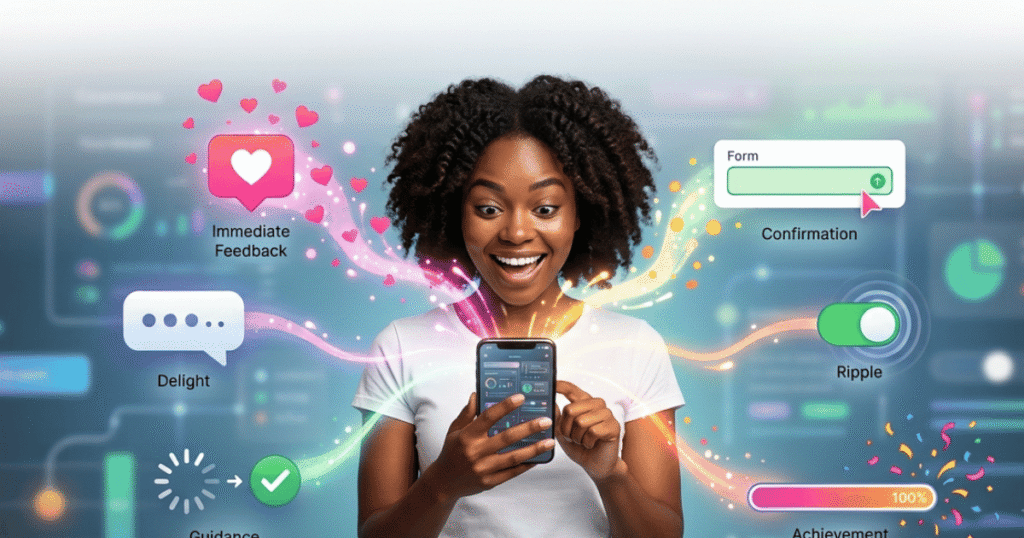
Microinteractions are small visual or functional responses that occur when users interact with a website or application.
They provide immediate feedback, confirm actions, and make interfaces feel more responsive.
Examples include:
- A button changing color when hovered over.
- A heart icon filling when a post is liked.
- A loading spinner while content is being processed.
- A checkmark appearing after submitting a form.
- A navigation menu smoothly expanding.
Although these interactions often last only a fraction of a second, they significantly improve the overall user experience.
Why Are Microinteractions Important?
Microinteractions make websites feel more interactive and user-friendly.
Benefits include:
- Provide instant feedback.
- Improve navigation.
- Reduce user confusion.
- Make interfaces feel responsive.
- Increase engagement.
- Create a more memorable experience.
- Strengthen your brand’s personality.
Thoughtfully designed microinteractions help users feel confident that their actions have been recognized.
Common Types of Microinteractions
1. Button Hover Effects
Buttons often change color, shadow, or size when users move their cursor over them.
This indicates that the element is clickable and encourages interaction.
2. Loading Indicators
Loading animations reassure visitors that the website is processing their request instead of appearing frozen.
Examples include:
- Spinners
- Progress bars
- Skeleton screens
- Animated dots
3. Form Validation
When users complete a form, microinteractions provide immediate feedback.
Examples include:
- Green checkmarks
- Error highlights
- Success messages
- Password strength indicators
These responses help users complete forms more efficiently.
4. Navigation Animations
Smooth transitions between menus and pages improve navigation without distracting visitors.
Examples include:
- Dropdown menus
- Sliding sidebars
- Expanding navigation panels
- Animated page transitions
5. Notification Feedback
Notifications help users understand the result of an action.
Examples include:
- “Item added to cart”
- Success icons
- Warning alerts
- Toast notifications
Clear feedback improves confidence and reduces uncertainty.
6. Toggle Switches
Instead of traditional checkboxes, many modern websites use animated toggle switches.
Examples include:
- Dark Mode
- Notification settings
- Privacy options
These interactions feel more natural and visually appealing.
7. Scroll Animations
Elements that gently fade, slide, or appear while scrolling help guide users through content without overwhelming them.
Used carefully, these animations make long pages more engaging.
Popular Microinteraction Examples
| Microinteraction | Purpose |
|---|---|
| Button Hover | Indicates clickable elements. |
| Loading Spinner | Shows that content is loading. |
| Form Validation | Confirms user input instantly. |
| Notification Toast | Displays action results. |
| Toggle Switch | Makes settings easier to use. |
| Progress Bar | Shows completion status. |
| Scroll Animation | Enhances content presentation. |
Common Microinteraction Mistakes
| Mistake | Better Solution |
|---|---|
| Too many animations | Use animations only where they improve usability. |
| Slow animation speed | Keep animations fast and responsive. |
| No feedback after clicking | Always provide visual confirmation. |
| Distracting effects | Prioritize functionality over decoration. |
| Inconsistent animations | Maintain a consistent animation style throughout the website. |
Best Practices
To create effective microinteractions:
- Keep animations subtle.
- Focus on improving usability.
- Respond immediately to user actions.
- Maintain consistent animation styles.
- Avoid excessive movement.
- Ensure animations perform smoothly on all devices.
- Test interactions with real users.
- Consider accessibility by respecting reduced-motion preferences.
How Elementor Can Create Microinteractions
Elementor provides several built-in tools for adding microinteractions without coding.
You can create:
- Button hover effects.
- Entrance animations.
- Motion effects.
- Sticky headers.
- Interactive icons.
- Hover image transitions.
- Animated call-to-action buttons.
Used thoughtfully, these features can make your website feel more polished while maintaining excellent usability.
Frequently Asked Questions (FAQ)
1. What are microinteractions?
Microinteractions are small animations or visual responses that occur when users interact with a website, such as button hover effects, loading indicators, or form validation messages.
2. Why are microinteractions important?
They provide immediate feedback, improve usability, reduce user confusion, and create a smoother, more engaging browsing experience.
3. Can too many microinteractions hurt user experience?
Yes. Excessive animations can distract users, slow down a website, and make navigation feel overwhelming. Microinteractions should always support usability rather than compete for attention.
4. Can Elementor create microinteractions?
Yes. Elementor includes features such as hover effects, motion effects, entrance animations, sticky headers, and interactive buttons that make it easy to add microinteractions without coding.
5. Do microinteractions affect website performance?
Well-optimized microinteractions usually have little impact on performance. However, overly complex or excessive animations may increase loading times and reduce responsiveness, especially on mobile devices.
Final Thoughts
Microinteractions may be small, but their impact on user experience is significant. From hover effects and loading animations to form validation and navigation feedback, these subtle interactions help visitors understand how your website works and make browsing more enjoyable.
The key is balance. Effective microinteractions enhance usability without becoming distracting. When used strategically, they can increase engagement, improve accessibility, and create a more professional and memorable website experience.