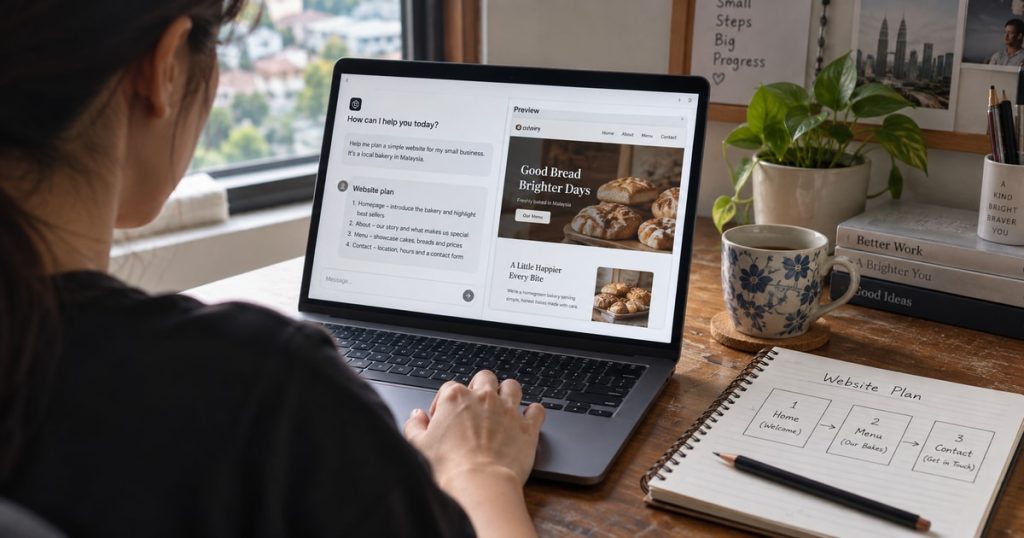
If you have never built a website, ChatGPT can make the process look surprisingly easy. You describe what you want and it can produce a page plan, written content or even website code.
But can ChatGPT build the whole website for you?
Yes, it can help build a website. However, the result may be a draft, code or a working preview. That is not always the same as a finished website that customers can find and use.
You still need to provide the correct information, check the result and test everything before publishing. This guide explains each step without assuming that you understand coding or web design.
Can ChatGPT Really Create a Complete Website?
ChatGPT can suggest pages, plan a layout, write content and create code. Some current ChatGPT and Codex workflows can also create previews or help deploy a website.
The word “website” can mean different things. A draft is something you review. A live website is something people can visit online. A business website may also need forms, bookings, payments or product pages.
A live website normally needs a domain and hosting. The domain is its address, such as yourbusiness.com. Hosting is the service that keeps the website online.
OpenAI’s official website-building use cases include front-end design, first versions and website deployment. Available tools can vary by account, plan and device.
For a beginner, the safest expectation is simple: ChatGPT can create a strong starting point, but the first result should still be checked.
What Should You Prepare Before Starting?
ChatGPT cannot understand your business unless you explain it. A prompt that only says “make a website for my company” gives it very little useful information.
Tell it what the business offers, where it operates and who the main customer is. Also explain what visitors should do, such as sending a WhatsApp message, requesting a quotation or booking an appointment.
You can start with this prompt:
Help me plan a simple website for a renovation company in Kuala Lumpur. We provide kitchen, bathroom and full-home renovation for homeowners. The main goal is to encourage suitable customers to request a quotation through WhatsApp. Use simple English. Do not invent prices, reviews or experience. Ask me questions if important information is missing.
Replace the example with your real business details. Accurate information is more useful than complicated instructions.
Step 1: Ask ChatGPT to Plan the Pages
First, ask which pages the website needs. This page plan is sometimes called a sitemap, but it is simply a list showing how the website is organised.
A small service business may need a homepage, service pages, an about page, project examples and a contact page. An online shop will also need pages for its products and checkout.
Ask ChatGPT to explain why each page is useful. Remove pages that repeat the same information and add anything customers need before making contact.
The homepage should quickly explain what the company does, who it helps and what the visitor should do next. You do not need to accept every suggestion. ChatGPT creates the first plan; you decide whether it suits your customers.
Step 2: Ask for a Simple Design
Website design is more than choosing colours. It decides which information appears first, how each section is arranged and where important buttons are placed.
Tell ChatGPT how the business should feel. An accounting company may need a clean and calm website, while a children’s centre may need something warmer and friendlier.
Ask it to describe the homepage from top to bottom. It can suggest a heading, introduction, services, proof and contact button. It can also suggest colours, fonts and suitable images.
If the company already has a logo or brand colours, provide them. Most importantly, make sure visitors can read the page and understand the service easily.
Step 3: Create the Website Content
ChatGPT can write quickly, but it needs facts from you. Work on one page at a time instead of requesting the entire website in one response.
Explain what each service includes, who it suits and what happens after a customer makes contact. ChatGPT can then turn the information into a clear draft.
Read every sentence before using it. Remove claims such as “the best in Malaysia” or “trusted by thousands” unless they are true. Check names, locations, prices, opening hours and contact details yourself.
You can ask ChatGPT to make the writing shorter, friendlier or easier to understand. It can also suggest page titles for Google, but this does not guarantee rankings. Learn more in [What Is AI SEO? How AI Is Changing Google Search](/what-is-ai-seo/).
Step 4: Turn the Draft Into a Real Website
Once the pages, design and content are ready, you need somewhere to build the website.
The simplest choice for a beginner is a website-building platform. You select a layout, add the ChatGPT content and images, then connect the pages. This normally requires little or no coding.
ChatGPT can also generate code, which is the set of instructions that creates the page in a browser. This gives more control but requires more testing and technical knowledge.
Depending on your available ChatGPT tools, you may be able to see a preview or work towards a published website. Otherwise, you can move the content or code into another platform or give it to a developer.
Do not worry if this stage feels harder. A design draft is only one part of launching a website. The domain, hosting, forms and other functions must still be connected. Avoid changing unknown code on a live business website without help.
Step 5: Test Everything Before Publishing
A website can look correct on a computer but be difficult to use on a phone. Open every important page on both screen sizes.
Check whether the text is readable, the menu works and buttons are easy to press. Submit every contact form and test email addresses, telephone numbers and WhatsApp links. If the website accepts bookings or payments, complete the whole process as a customer.
Replace all sample text and images. Confirm the business name, service area and opening hours. Make sure you have permission to use every photograph, logo and customer review.
ChatGPT can prepare a testing checklist, but a person must carry out the tests. Ask someone unfamiliar with the business to try the website too. A new visitor may notice a confusing section that the owner missed.
Can a Beginner Build a Website Without a Designer?
A beginner may be able to create a personal site, simple company profile or early business idea with ChatGPT and a website platform. It takes time, but it can be a useful way to learn.
Professional help becomes more important when the website handles payments, private information, complicated bookings or valuable sales enquiries. Help may also be needed when the website looks finished but does not work well on mobile or explain the service clearly.
Before choosing the DIY route only because it looks cheaper, compare what AI website design actually costs and consider the time needed to learn, write and test everything.
If ChatGPT has created your first draft but you are unsure what to do next, speak with QC Fixer about professional web design. QC Fixer can review the design, content, mobile experience, SEO and important functions before customers use the website.
ChatGPT really can help build a website. The important difference is whether you only have a generated draft or a website that has been checked and prepared for real use.
Frequently Asked Questions
Can ChatGPT build a website without coding?
Yes. It can prepare the pages, design direction and content for a website-building platform. Custom websites may still need code or professional help.
Can ChatGPT publish the website for me?
Some current ChatGPT and Codex workflows support website previews and deployment. Availability depends on the account, plan, device and tools being used.
Do I still need a domain and hosting?
Usually, yes. The domain is the website address, while hosting keeps the website online. Some website platforms include hosting in their plans.
Is ChatGPT-generated content ready to publish?
Not automatically. Check every claim, price, location, service detail and contact method. The final content should represent the real business accurately.
Will a ChatGPT website appear on Google?
It can appear if search engines can access it. Ranking still depends on useful content, website quality, competition and continued SEO work.